

ADP Workforce Now® has earned its rep as a trusted name in HR and payroll. It centralizes your people data, handles compliance, runs payroll reliably, and keeps core workforce information in one place. For thousands of businesses, it’s the anchor of their entire operation.
MakeShift takes that foundation further by allowing for true schedule automation.
For shift-based businesses like healthcare facilities, retail chains, golf courses, hospitality groups, and security firms, pairing ADP with a dedicated scheduling and time partner transforms what’s already working into a fully integrated workforce management system.
✔ Schedules flow automatically into ADP.
✔ Time punches sync without manual entry.
✔ Labor budgets update in real time.
✔ Payroll runs on accurate, synced hours.
The result is an ADP setup that does more than manage your people data. It actively helps you put the right people in the right place, at the right cost, week after week.
That’s what MakeShift was designed to deliver, and why it’s become ADP’s best-selling scheduling app on the Marketplace. Let’s get into why so many ADP clients choose MakeShift.
What Makes MakeShift the Standout Choice for ADP Clients
There are other scheduling apps on the ADP Marketplace. So why do ADP clients consistently choose MakeShift and stay with it?
1. The Deepest ADP Integration on the Marketplace
Most scheduling apps connect to ADP only in a limited way, like simply pulling employee names. MakeShift dives into the deep end of the scheduling pool, and that’s what separates it from everything else on the Marketplace.
MakeShift is ADP’s best-selling scheduling app and its preferred AI partner for scheduling. It’s also one of the only apps on the Marketplace to offer fully synchronized data across schedules, time, punches, PTO, users, and SSO in a single integration.
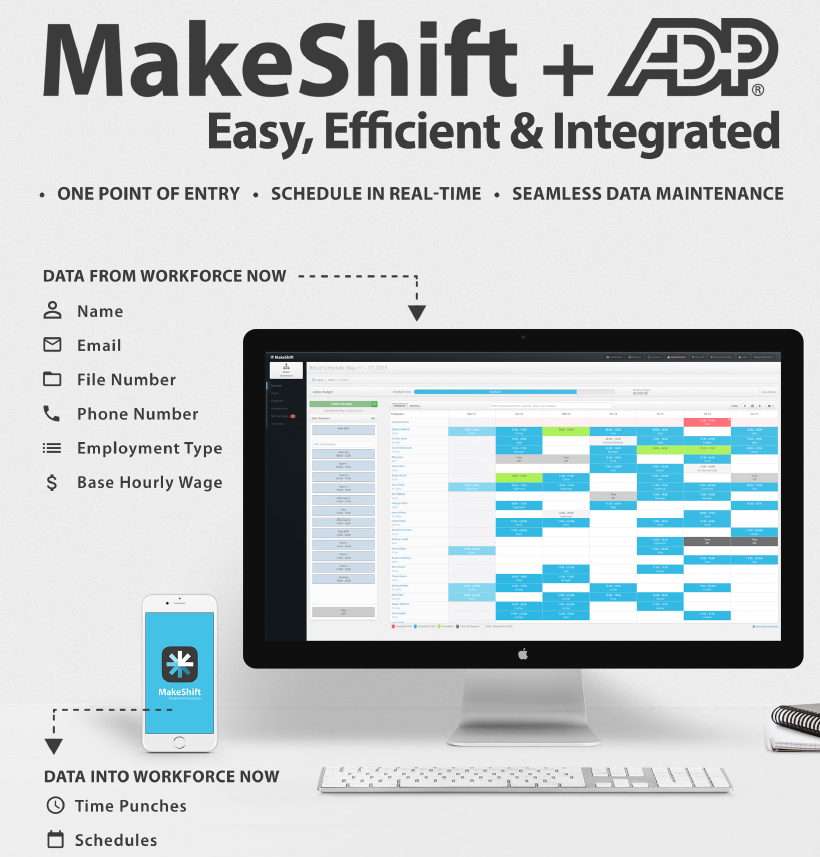
Here’s what that looks like:
- Single Sign-On (SSO) – Your team logs into MakeShift using their existing ADP credentials. No separate passwords, no friction.
- What syncs FROM ADP → MakeShift – Employee name, email, phone, employment type, base hourly wage, and approved time off. Your people data stays in ADP as the system of record. MakeShift just puts it to work.
- What syncs FROM MakeShift → ADP – Published scheduled shifts (with up to 3 levels of labor detail) and time pairs/punches automatically sync, no manual re-entry required.
- Timecard exception flagging – Schedules auto-populate from MakeShift into ADP, flagging any timecard exceptions for fast review. Payroll errors get caught before they become problems.
Note: SSO login is only available on Workforce Now and Essential Time — Next Generation doesn’t currently support it, though schedule, time, PTO, and user data all still sync across all three.
MakeShift integrates with ADP Workforce Now®, ADP Workforce Now® Essential Time, and ADP Workforce Now® Next Generation. Whichever version of ADP you’re using, MakeShift can connect.
2. Scheduling Built for How Shift-Based Teams Really Work
Scheduling software that works for a 9-to-5 office doesn’t necessarily work for a hospital floor, a restaurant, or a retail chain. MakeShift was purpose-built for the realities of shift-based operations, and our features prove that.
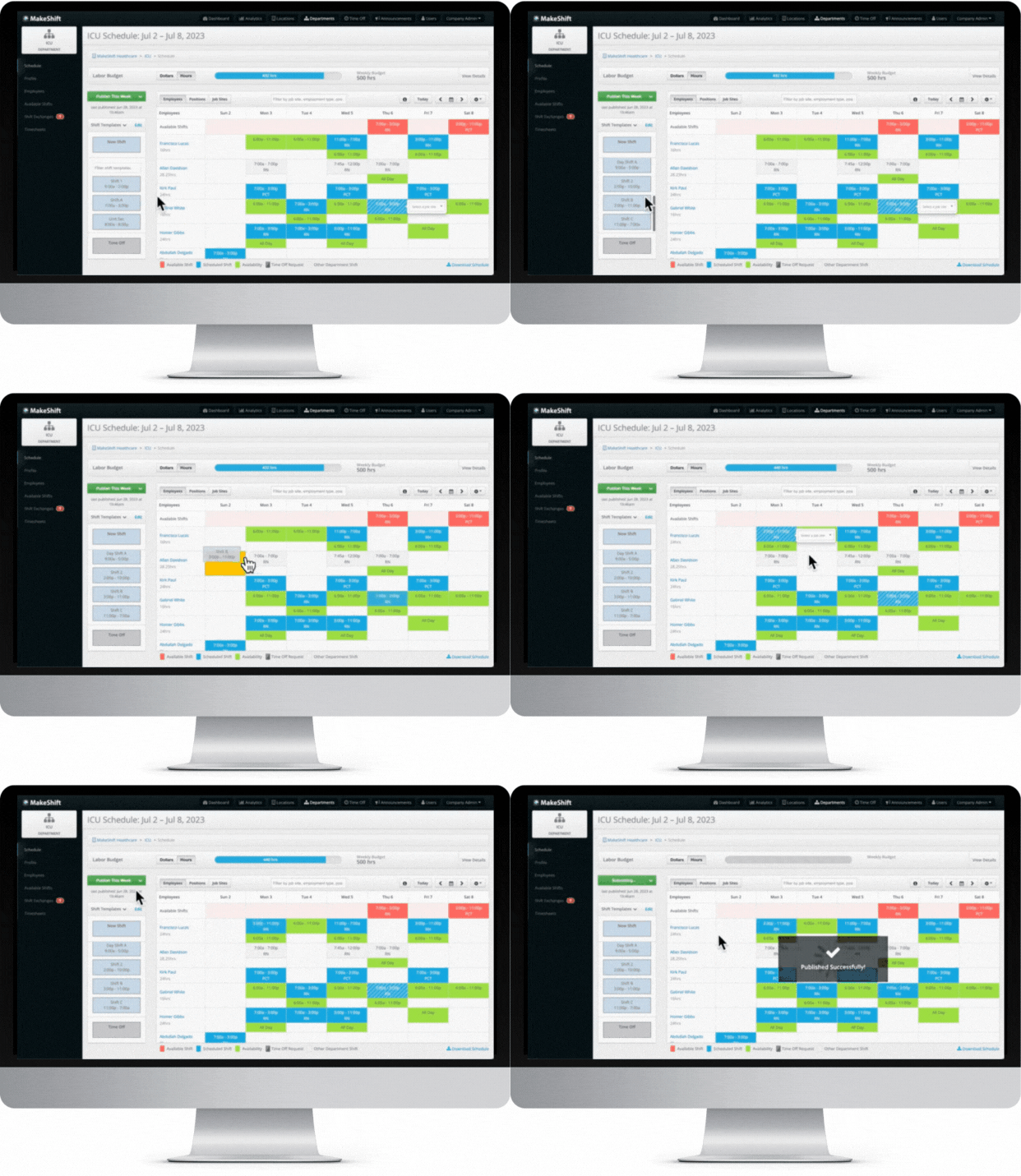
Building a schedule in MakeShift is quick and visual. Managers drag and drop shifts into place and copy entire schedules week over week for teams with fixed patterns, without having to start from scratch each time.
Employee availability shows right on the schedule as you build. The department calendar shows who’s working, who’s available, and who’s off — all in one view — so you’re scheduling against real availability instead of digging through profiles or booking someone onto a day they can’t work.
As shifts are built, real-time labor budget tracking shows projected costs updating with every change, so you can set budgets daily, weekly, or by demand and know immediately when you’re over budget.
Need to fill a gap? Role-based scheduling lets you filter by role, position, or job site and instantly see who’s available and qualified.
Covering open shifts is just as straightforward. The Available Shifts feature lets managers broadcast open shifts to eligible employees with a single click. Employees request a shift, the manager approves it, and the schedule updates automatically.
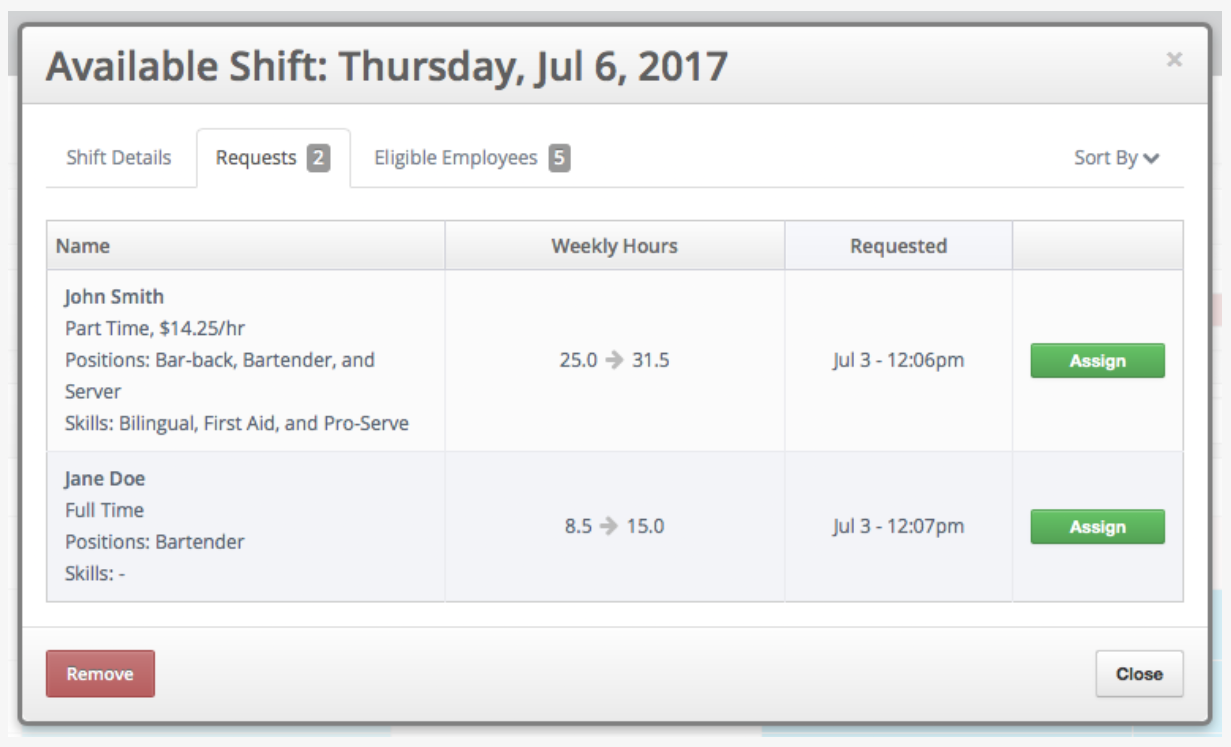
Employees can also post, trade, and cover shifts directly from their phones, with managers retaining final approval throughout. The MakeShift Live mobile app allows managers to handle coverage requests on the go, offering a more realistic, flexible option for many shift-based industries.
3. AI-Powered Scheduling with ShiftMate AI
Scheduling is getting smarter, and MakeShift is leading the way. As the only scheduling solution in ADP’s AI Marketplace, MakeShift’s ShiftMate AI suite incorporates intelligence into every part of the scheduling process.
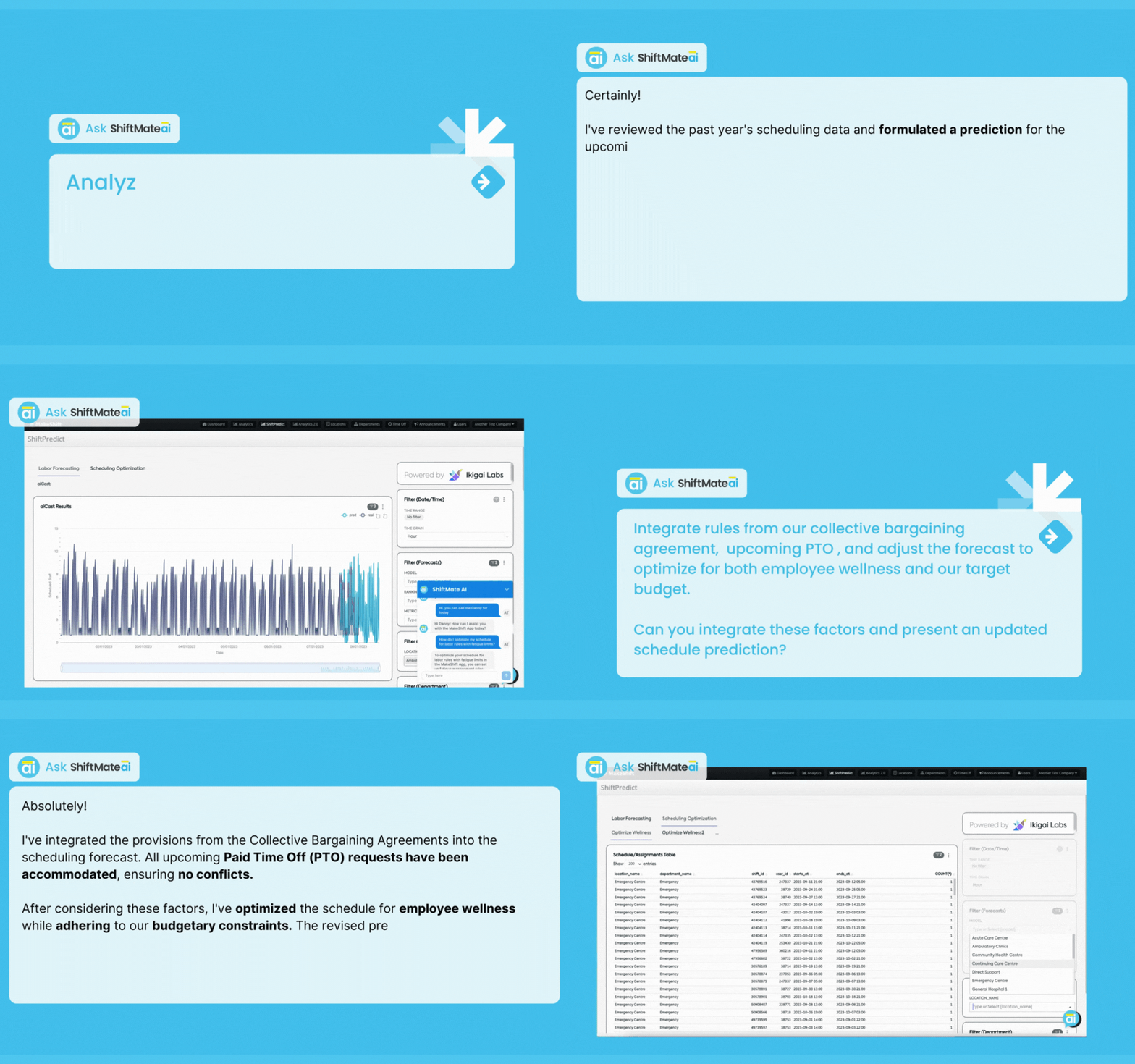
ShiftPredict takes the guesswork out of staffing forecasts. Rather than relying on gut feel or last week’s schedule, it analyzes historical data, shift-swap patterns, collective bargaining rules, and real-time external factors to recommend optimal staffing levels, minus hours of manual planning.
When managers or staff have scheduling questions, SmartSupport is available around the clock to answer them.
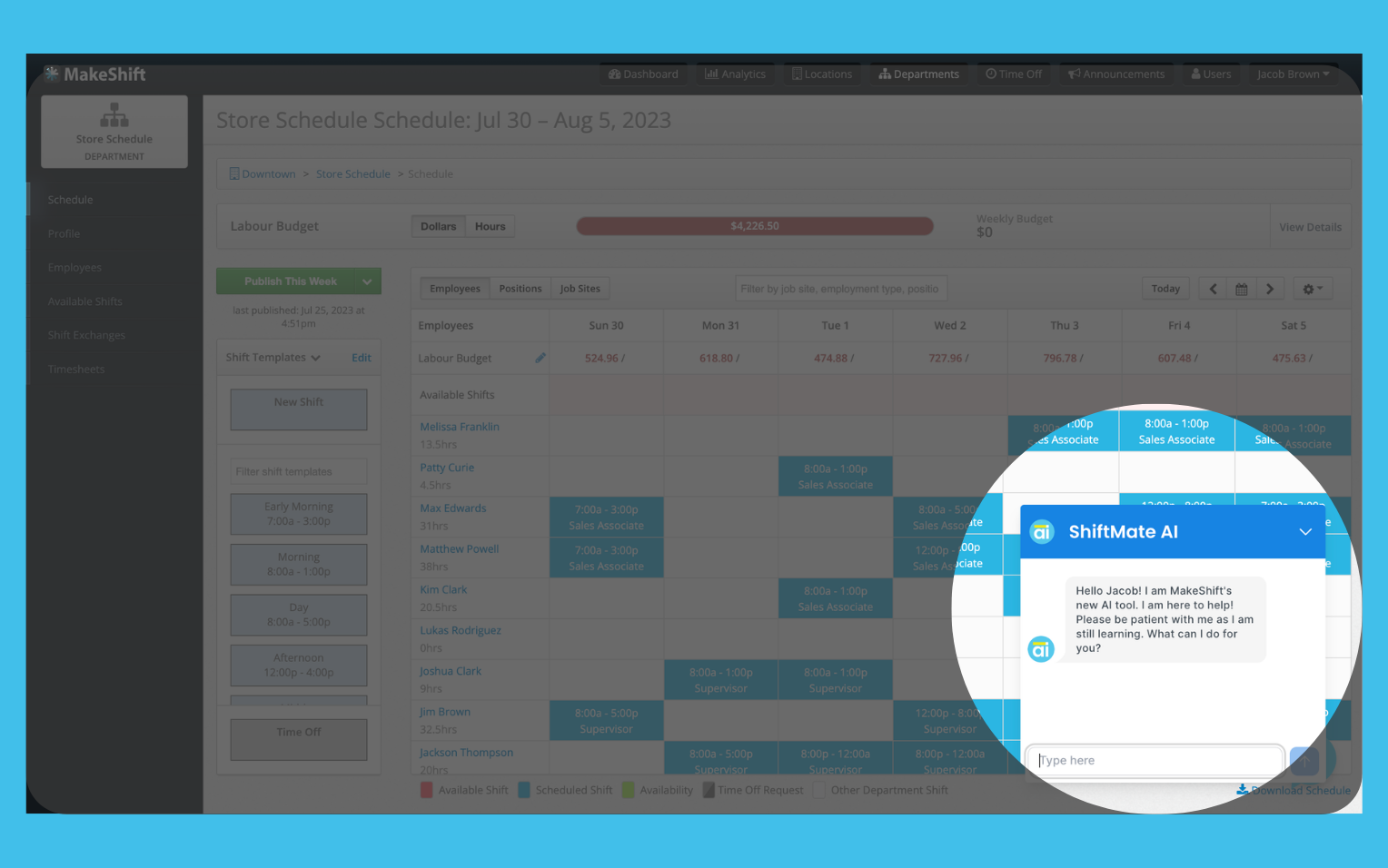
MakeShift’s AI is focused exclusively on scheduling optimization. It’s designed to support humans making decisions, not replace them. You stay in charge, ShiftMate just makes your decisions faster and better-informed.
4. More Control Over Where and How Employees Clock In
If you’ve ever wished your team could only punch in from a specific location rather than anywhere with a phone signal or run into a wall trying to configure non-standard overtime rules for your operation, you’re not alone. These are among the most common friction points shift-based industries run into.
Particularly for multi-site businesses, the gap between what standard time tools offer and what shift workers need can be significant.
MakeShift for ADP Workforce Now® Essential Time edition is built for intelligent scheduling and precise time tracking for teams of all sizes. On top of the full scheduling platform, it adds an extra layer of time tracking and punch management, giving managers control over how and where time is recorded.
Employees clock in and out on their phones via mobile punch, but geofencing means they can only do so when they’re physically on-site, not from their couch or a lounge chair at the lake.
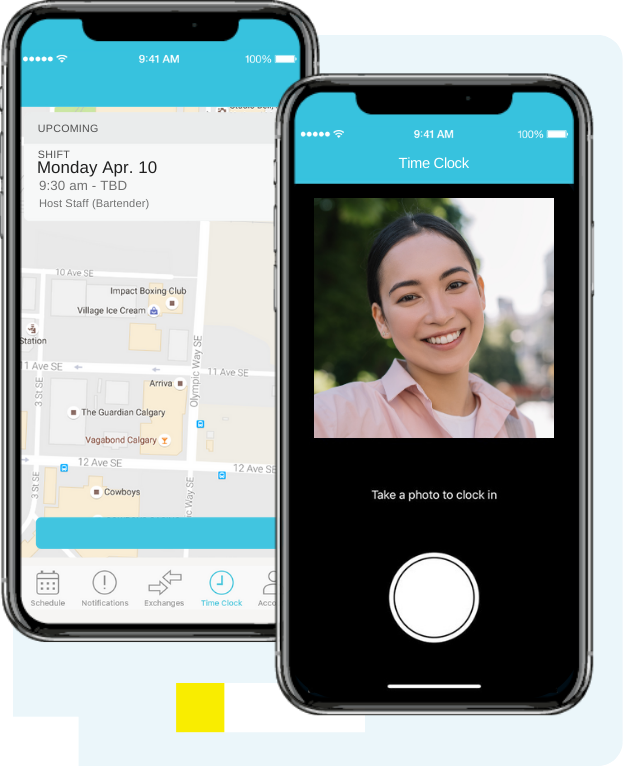
Photo punches capture an image at clock-in to verify identity and reduce time theft, which is impactful in any business, but especially in high-turnover environments where accountability is hard to enforce.
For locations where personal devices aren’t practical, kiosk mode turns any shared tablet into a dedicated clock-in and out station.
And for businesses running non-standard overtime structures, like daily thresholds, blended rates, and stat holiday pay, custom overtime rules let you configure calculations that match your labor agreements, rather than bending your operation to fit the software.
All of it syncs directly back to ADP, so the time clock data hitting payroll is accurate from the get-go. Explore the Scheduling & Time edition on the ADP Marketplace.
5. An Employee Experience That Reduces Turnover
Scheduling is obviously a management problem, but it’s also an employee experience problem.
When employees don’t know their schedules in advance, can’t swap shifts without jumping through hoops, or have no simple way to make schedule requests, engagement tanks.
And so does retention.
In industries already fighting high turnover, that’s a risky gamble.
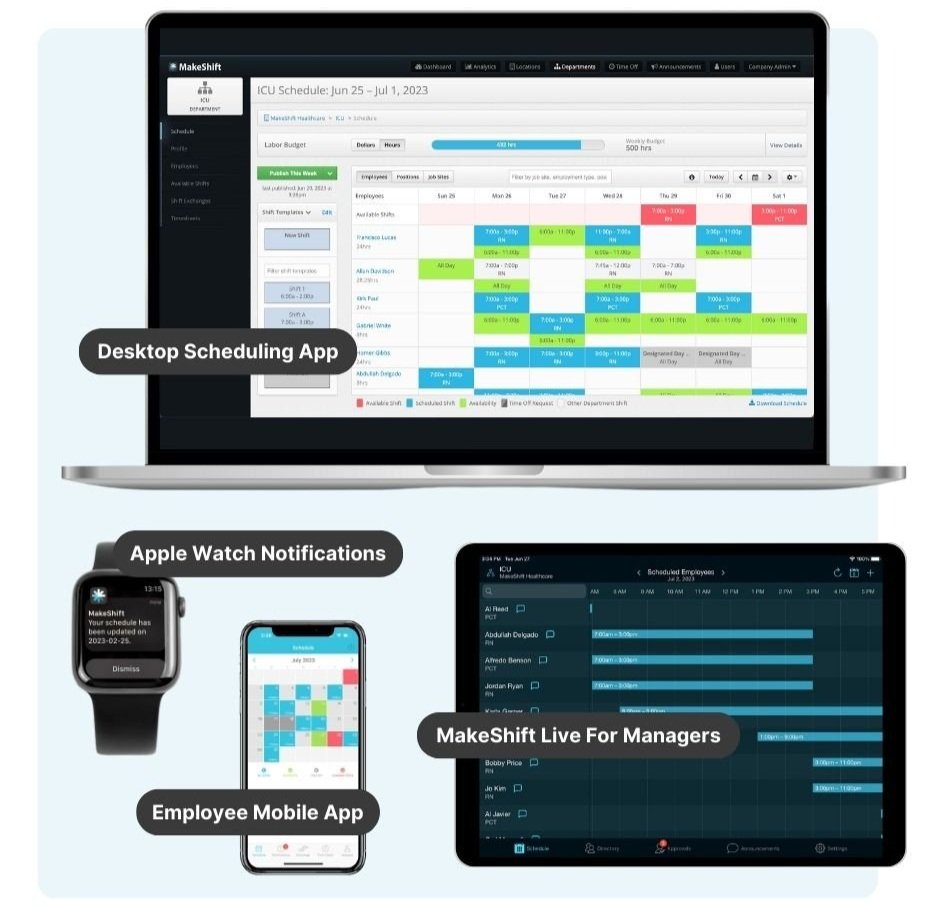
MakeShift puts the schedule in every employee’s pocket via iOS and Android apps with real-time updates. From their phone, employees can set availability, request time off, swap shifts, and easily view their schedules.
No phone calls to the manager. No paperwork shuffle to swap a shift.
The impact is measurable. Employees supported by tech that works for them are 158% more engaged and 61% more likely to stay past the 3-year mark.
For shift-based businesses with sky-high replacement costs, that kind of retention is a competitive advantage.
Real ADP Clients. Real Results.
Understanding what MakeShift does is one thing. Seeing how it delivers for real ADP clients is where it comes together.
Snow Valley Saved 118 Manual Hours Annually
It’s peak ski season at Snow Valley in Edmonton, AB. Over 350 staff members rotate through shifts across a ski hill, an aerial park, a campground, and a banquet facility.
Schedules change constantly, and every uncovered shift means guests waiting and on-site staff scrambling to pick up the slack. The scheduling manager isn’t leading the team — she’s buried in a spreadsheet, manually tracking who’s available, who called out or swapped shifts, and whether any of it synced back to ADP. That was Snow Valley before incorporating MakeShift.
- Industry – Seasonal outdoor recreation (Edmonton, AB)
- Size – 350+ employees on ADP Workforce Now® for payroll
- Challenge – Managers were losing significant productivity due to manual scheduling, uncovered shifts, and a lack of real-time mobile access for staff and managers.
- Result – 118 hours saved annually, over-staffing costs eliminated, new team members onboarded within minutes, and a dramatically improved employee experience.
The ADP + MakeShift integration auto-populated employee data from ADP, automatically synced published schedules, and flagged timecard exceptions, eliminating duplicate entries and payroll errors in one shot.
“Our employees love MakeShift — It has been a game changer for us. In our industry, individuals look for flexible work schedules, and MakeShift gives them exactly that.”
— Jennifer Weremczuk, Snow Valley
All In Adventures – Consistent Staffing Across 31 Locations

Imagine running 31 escape room locations across 15 states — each one staffed with greeters, front desk associates, and game hosts who need to be ready to roll the moment the doors open.
One wrong assignment and a customer’s birthday experience falls apart. When All In Adventures first started scaling, that coordination happened through a patchwork of texts and manual shift sheets. Then they implemented ADP Workforce Now® and MakeShift together in 2017, and the chaos became a system.
- Industry – Retail — Escape Room (Duluth, GA)
- Challenge – Role-specific scheduling across high-traffic mall locations, real-time coverage for dynamic weekend and event-based demand, and onboarding new locations at scale.
- Result – Consistent staffing across every location, mobile adoption that attracted and retained younger talent, and managers who shifted from reactive firefighting to proactive two-week schedule planning.
MakeShift’s role tagging lets managers see who’s trained for which room and role, and who’s available to fill gaps instantly via the app.
“What definitely stands out with ADP and MakeShift is the ease of use. Plus, the mobile aspect to managing, communicating, and reporting makes our scheduling process very smooth, without surprises.”
— Chetan Patel, President, All In Adventures
Hollyburn Family Services – Predictable Scheduling for a Complex Care Environment
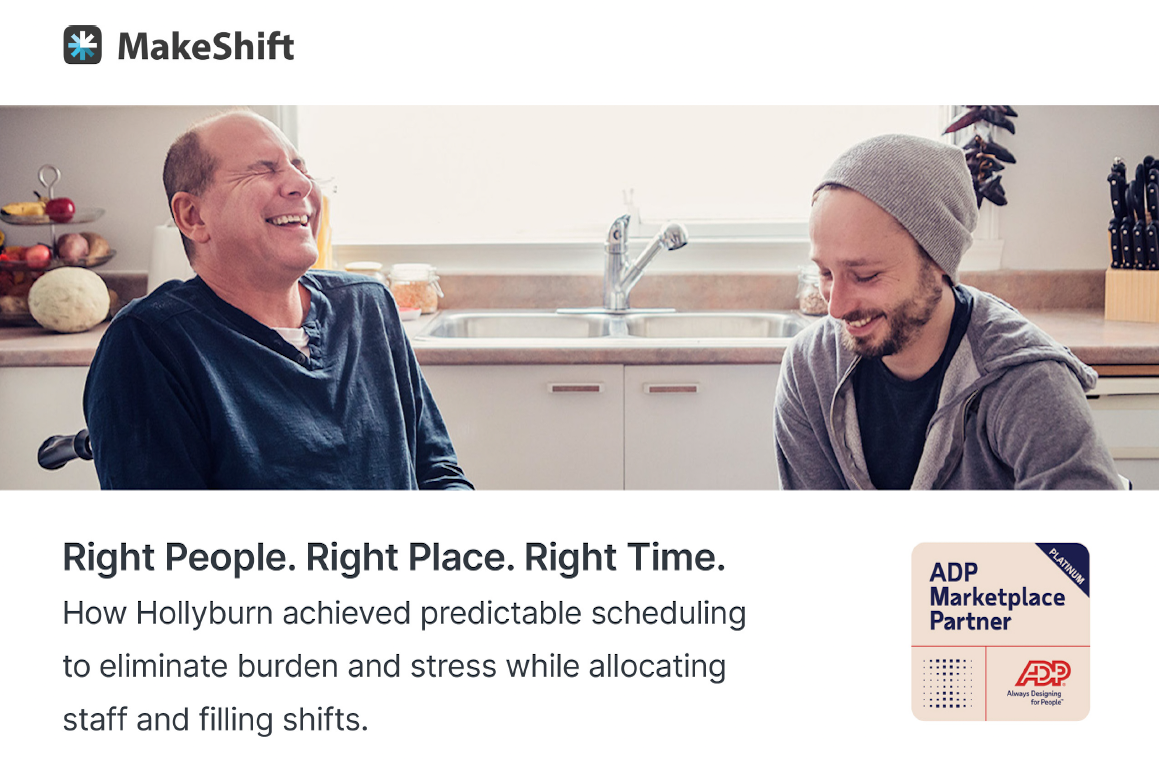
Hollyburn Family Services has been supporting children, youth, adults, and families in the Greater Vancouver area since 1990. As a non-profit social services organization with a large part-time workforce, its scheduling challenges centered around the complexity of filling each shift while honoring employee preferences.
Supervisors spent hours manually building schedules, then even more time calling employees one by one to cover vacant shifts. The administrative burden was crushing and pulling people away from the work that actually mattered.
- Industry – Healthcare & Social Services (Greater Vancouver, BC)
- Challenge – Manual scheduling that drained supervisor productivity; vacant shifts filled by phone calls; a diverse, multi-generational workforce that needed a tool accessible to everyone.
- Result – Reduced overtime costs, increased scheduling accountability with real-time visibility for management, and improved employee experience because every staff member is now able to access and manage their schedule independently.
MakeShift was recommended to Hollyburn by an ADP rep. The platform’s intuitive, people-first design made it immediately accessible to staff of all ages, tech comfort levels, and backgrounds, a non-negotiable for an organization serving such a wide community.
“MakeShift has been AMAZING. The whole project from build-out to continued support has been successful because of the MakeShift support team… They have been super helpful in producing reports which are critical to my ability to make decisions.”
— Laurie Dalzell, Hollyburn Relief & Recruiting Manager
Is MakeShift Right for You?
MakeShift is purpose-built for shift-based industries like healthcare, retail, hospitality, security, recreation, construction, and golf. It works whether you have 25 employees or 3,500+.
If you’re already on ADP Workforce Now®, the integration is ready to activate. Employee data syncs automatically — no manual re-entry, no duplicate systems. MakeShift’s onboarding team handles implementation and staff training, with most small- to mid-sized businesses up and running in about 2 weeks.
The question isn’t whether MakeShift can fit your operation. It’s whether the cost of not using it, in avoidable labor waste, manager hours, and employee wellness, is something you want to keep absorbing.
Frequently Asked Questions
Can I try MakeShift for free?
Absolutely. MakeShift offers free trials through the ADP Marketplace. A trial works best when it runs alongside your real ADP data. MakeShift offers a discount code for a free trial that connects directly to your ADP Workforce Now account. Reach out to sales@makeshift.ca to get started.
What’s required to set up the MakeShift integration with ADP Workforce Now?
Purchase the MakeShift app directly from the ADP Marketplace using your Workforce Now credentials. Once you consent within the Marketplace and complete a secondary consent step from ADP, a MakeShift Implementation Specialist takes it from there by setting up your implementation plan and training your team.
How long does implementation take?
As mentioned above, on average, implementation takes roughly 2 weeks for small to mid-sized businesses and requires about 2.5 hours of admin time per week. Your Implementation Specialist will tailor the timeline to your specific setup.
How does the MakeShift–ADP integration actually work?
After purchase, API calls are made to your Workforce Now database, and scheduling info is pulled into the MakeShift employee import screen. With your Implementation Specialist’s guidance, you choose which users to import and how to structure your organization. From that point on, data syncs automatically for all active employees.
Upgrade Your ADP Setup With a More Intuitive Scheduling & Time Solution
ADP is a powerful system. MakeShift is the scheduling and time-tracking layer that completes it.
Every week without a smarter scheduling solution is a week of avoidable labor costs, manager hours spent fixing problems instead of leading people, and employee friction that quietly chips away at the retention you’ve worked hard to build. None of that shows up as a line item, but it adds up fast.
MakeShift doesn’t require you to leave the ADP ecosystem or rebuild your workflows from scratch. It connects directly to what you already have and makes it work harder. If you’re already on ADP Workforce Now®, the integration is ready to activate.
Ready to see what smarter scheduling looks like? Find MakeShift on the ADP Marketplace or contact sales@makeshift.ca to start your free trial or schedule a demo today.